

















Part of our Databricks Lakebase series. This is the third article. See the full series index at the end.
A fraud model needs features like how many times a card was used in the last 30 days, and it needs them while the payment is happening. For a payments company moving its fraud feature store to Databricks, the budget for that lookup was 250 ms at p99. Serving straight from Unity Catalog through endpoints landed at 300 to 400 ms. So we put Databricks Lakebase Postgres, serverless Postgres for apps and agents, in the path. Measured by the fraud service on real traffic, Lakebase served those features at a p99 of 70.5 ms.
How do features get from Unity Catalog to the fraud service?
Long-window features (one day up to all-time) are computed in batch into Silver tables in Unity Catalog. Synced tables in triggered mode push them to Lakebase, and the fraud service reads Postgres directly over JDBC. Cadence follows the data: long windows change less, so they refresh less often. Short windows, which need sub-second freshness, still run on the existing streaming stack; their path on Databricks is Apache Spark™ Real-Time Mode writing to Lakebase, covered in our Real-Time Mode post.
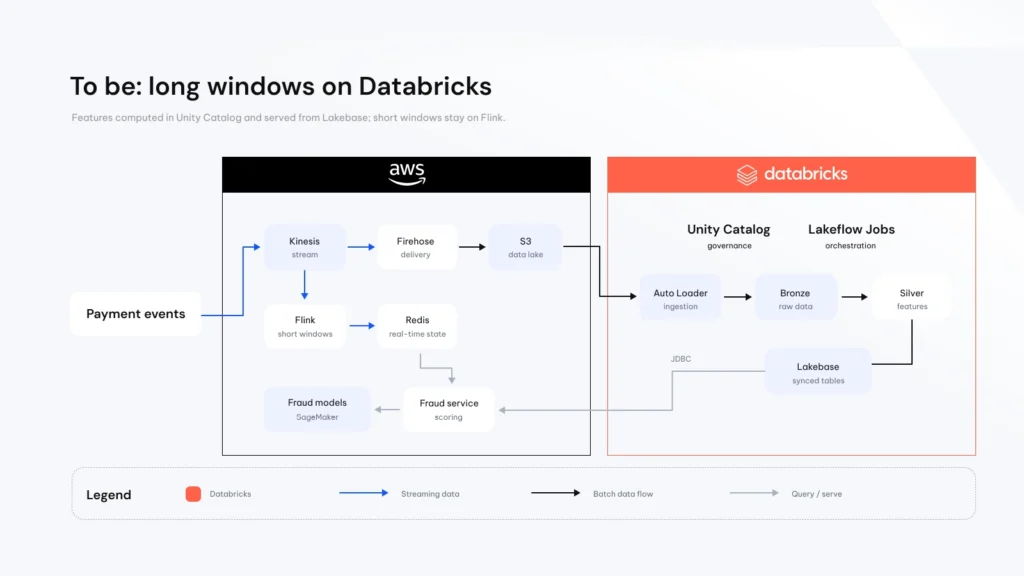
The read path got shorter over time. A Databricks App in front added 1.2 to 1.5 s per request through its proxy, and in September JDBC replaced Model Serving as the read path. Keep nothing between the service and Postgres that you don’t need.
How fast is Lakebase on real traffic?
The fraud team moved traffic to Lakebase step by step in shadow mode, where the call happens but doesn’t affect the transaction, and measured p99 from their side: service → JDBC → Lakebase.
| Share of traffic | p99, first ramp | p99, second ramp |
|---|---|---|
| 60% | 96 ms | 29 ms |
| 70% | 227 ms | 39 ms |
| 80% | 248 ms | 43 ms |
| 90% | 358 ms | 49 ms |
| 100% | Not reached | 70.5 ms |
The first ramp fell apart after 60%. Between ramps we raised the compute range and the fraud team made changes on their side, so we can’t split the credit. At 100%, over 18 minutes and hundreds of thousands of queries per minute: average 11.7 ms, p95 41 ms, p99 70.5 ms, p99.9 162 ms. Well under the 250 ms budget, measured by the consumer on real traffic. Our own lab test gave a p99 of 4 ms over ~640,000 lookups; we trust the 70 ms more.
What we learned operating it
- Autoscaling watches CPU and memory, not connections. In an early test CPU looked healthy while timeouts piled up.
- If it isn’t in infrastructure code, it isn’t changed. A manual compute change was overwritten by a later infrastructure apply, and latency went up 10x the next day.
- Keep bulk loads away from readers. An initial load of hundreds of millions of rows on the same compute brought timeouts back. We moved big loads off-peak and added a read replica.
- Size the replica for replay, not only reads. A replica replays every write; while catching up on a sync it ran near its CPU limit and p99 roughly tripled until we gave it more compute.
- The bottleneck moves to writes. Sync throughput, not read latency, became the number to size for.
- Retention must exceed your worst sync lag. A triggered sync that lags past Delta retention loses its place.
- Every synced table is its own pipeline and its own meter. Use triggered mode unless the app truly needs continuous freshness, and put guardrails on how many synced tables can be created.
If you’re putting Lakebase behind a real-time service
- Measure from the client. A check from another region said 115 ms at p50, mostly network.
- Ramp in shadow mode first.
- Put compute settings in code.
- Separate reads from bulk writes, and size replicas for replay.
- Measure sync rows per second on your own tables before picking a cadence.
- Keep the read path short.
Conclusion
Lakebase gives the lakehouse a serving layer: features computed in Unity Catalog, read by a fraud service in milliseconds, under one governance model. It doesn’t remove the work of operating a database under load. Next: finishing validation and moving the traffic out of shadow mode.
-
What is Databricks Lakebase?
Databricks Lakebase Postgres is a fully managed, serverless Postgres service that separates compute from storage, so operational workloads run directly on the Databricks Data + AI Platform with the same governance and security as analytics and AI. It supports serverless autoscaling and scale to zero, instant zero-copy database branching, point-in-time recovery, and unified governance through Unity Catalog.
Learn more: Lakebase product page · Lakebase Postgres documentation
-
How fast can Databricks Lakebase serve features to a real-time service?
In this payments case, measured by the fraud service itself on real traffic in shadow mode, Lakebase served features with an average of 11.7 ms, a p95 of 41 ms and a p99 of 70.5 ms at 100% of traffic, well under the 250 ms budget
-
How do features get from Unity Catalog into Lakebase?
Long-window features are computed in batch into Silver tables in Unity Catalog, and synced tables in triggered mode push them to Lakebase. The fraud service then reads Postgres directly over JDBC.
-
What is shadow mode in feature serving?
In shadow mode the service calls the new feature store on real traffic, but the result doesn’t affect the transaction. It lets the team measure latency and correctness at increasing shares of traffic before going live.
-
What are the main lessons for running Lakebase under load?
Measure latency from the client, ramp in shadow mode, keep compute settings in infrastructure code, separate bulk writes from reads, size read replicas for write replay, and size for sync throughput, which becomes the bottleneck before read latency does.
Databricks Lakebase series
- Part 1: Databricks Lakebase and Spark Real-Time Mode for Aggregations
- Part 2: Databricks Lakebase Search and Branching: a Hands-On Guide
- Part 3: Serving Fraud Features from Databricks Lakebase: a p99 of 70 ms on Real Traffic (you are here)
- Part 4: coming soon