











Intro: the gap between streaming and serving
In real-time systems, there is a demand to transform transactional data into something more analytical. Events arrive in milliseconds, but the numbers that matter are not single events. They are aggregates: how many payments a merchant approved in the last ten minutes, what share of them were rejected, how today’s volume compares with the same hour last week.
Computing those aggregates in a stream is a solved problem. Serving them is where the delay piles up:
- Analytical tables are built for scans, not lookups. A streaming job that writes aggregates to a lakehouse table makes them visible only when a new table snapshot is committed. Every downstream consumer then has to poll for that snapshot and scan a time range to find the keys it cares about.
- Consumers rebuild what the producer already knew. When aggregates land as partial buckets, every consumer has to reassemble the window it needs and guess whether it is complete.
- Every team rebuilds the pipeline. Each new event source and each new use case gets its own bespoke aggregation job, with its own window semantics and its own failure modes.
Databricks now closes this gap inside the platform. Spark Real-Time Mode computes stateful aggregations with low latency, and Lakebase serves the results by key from a managed Postgres database governed by Unity Catalog, right next to the lakehouse and the jobs that use them.
What are Lakebase and Spark Real-Time Mode?
Lakebase
Lakebase is the operational database of the Databricks platform: a fully managed Postgres database integrated into the Databricks platform, built for transactional, low-latency workloads next to the lakehouse.
- Postgres semantics. It offers tables, primary keys, indexes, upserts and point lookups, accessible from any Postgres client.
- Unity Catalog governance. A Lakebase database can be registered in Unity Catalog as a read-only catalog, which makes its tables discoverable and governed alongside the rest of the lakehouse.
- Databricks identities. Jobs, apps and users connect with OAuth database credentials minted for their Databricks identity. The credentials expire after one hour, so no long-lived passwords need to be distributed.
- Lakehouse integration in both directions. Synced tables copy Delta tables into Lakebase for low-latency reads, and Lakebase Change Data Feed streams row-level changes from Lakebase back into Delta tables in Unity Catalog. Change Data Feed is currently in Public Preview.
- Operational features. It provides autoscaling, scale to zero, branching, read replicas, high availability and disaster recovery.
Spark Real-Time Mode
Real-Time Mode is a Structured Streaming trigger designed for low-latency workloads, which Databricks describes as up to 100x faster than micro-batch mode. Instead of scheduling a new set of tasks for every micro-batch, it runs long-lived batches. All stages of the query are scheduled at the same time, and records pass between them through a streaming shuffle as soon as they are produced.
It supports stateful processing: an operator can keep per-key state in Spark’s managed state store and register processing-time timers that fire at a chosen moment. Together, these make it possible to hold a window open, accumulate events into it, and emit the result at exactly the right moment.
Why bring OLTP next to your streaming pipelines?
Pairing Real-Time Mode with Lakebase gives a streaming pipeline a destination built for the way its output is actually read.
- Results are readable as soon as they are emitted. With the Lakebase sink, a Real-Time Mode query writes finished aggregates straight into a Lakebase table with sub-second latency, upserting on the table’s primary key. There is no table commit to wait for and no downstream poll before a consumer can read the result.
- Reads become direct key lookups instead of scans. A consumer interested in one merchant fetches exactly that merchant’s recent windows by key. The cost of a read no longer grows with the volume of the whole table.
- Real-Time Mode needs a serving sink. Delta is not a supported Real-Time Mode sink, so Lakebase is the natural primary destination for low-latency aggregates. History still reaches the lakehouse through Lakebase Change Data Feed.
- One copy of the truth for online and offline use. The same finalized windows serve real-time consumers and, through Delta, historical analysis and offline features.
- One governance model. Lakebase tables, Delta tables and volumes all live under Unity Catalog, with grants scoped per job and per app.
- Fewer moving parts. The stream, the serving database and the orchestration all run on one platform and deploy together as code.
Qubika case study: real-time anomaly detection for a payments company
The context
The client is a payments company that processes transactions for merchants in many countries. Every country brings its own payment methods, regulations, banking partners and traffic patterns, so the health of the payment flow varies by merchant, country and method, and changes throughout the day.
Interruptions in this flow translate directly into lost sales for merchants. A drop in approved volume, a fall in conversion rate or a spike in rejections for a single merchant in a single country must be detected within minutes and routed to the team that owns it. Unlike fraud detection, anomaly detection looks for shifts in trends across a time series, so it depends entirely on a reliable, fast mechanism to turn events into aggregated windows.
What Qubika built
A reusable aggregation library on Spark Real-Time Mode. Qubika built the aggregation layer as a library and a template, not a single-purpose pipeline:
- Each team points it at its own event stream and declares its aggregation definitions in a catalog file. A definition sets the fields to group by, the operation (count, sum, average, ratio or approximate distinct count), the filters and the window size.
- The query reads payment events directly from Amazon Kinesis, with no landing table in between.
- A stateful operator keeps one accumulator per definition, entity and window. Once the window has closed and its out-of-order allowance has passed, it emits exactly one finalized window.
- Finalized windows are upserted into a Unity Catalog-registered Lakebase table.
Anomaly detection is the first consumer of the library, and fraud detection is the next.
Lakebase as the online layer. Finalized windows are stored in Lakebase as key-value rows, indexed by entity, definition and window, so any consumer can fetch the recent history of one key with a direct lookup. History flows to Delta tables in Unity Catalog for backfills, analysis and offline features.
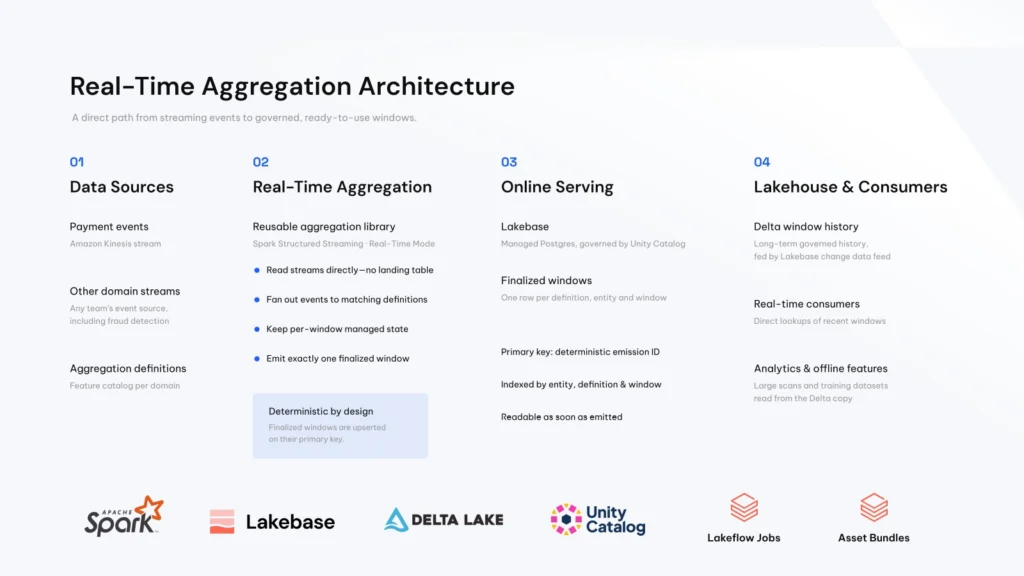
Everything as code. Every job is defined in Databricks Asset Bundles, and every table and volume is governed by Unity Catalog.
How these windows feed model training, Model Serving and real-time anomaly scoring is the subject of a follow-up article.
The results
- Lower latency. Windows are readable in Lakebase as soon as they are emitted. Time from event to readable window: from minutes, to miliseconds.
- Key-value retrieval. Consumers fetch exactly the windows they need for each key. Lakebase read latency: P99.9 less than 100 ms.
- A reusable library. Any source, any domain. Teams running their own pipelines on the library.
Other potential use cases
The same pattern applies wherever a stream has to be turned into numbers that are read by key:
- Real-time features for fraud and risk. Velocity features, such as counts and amounts per card, device or merchant over short windows, can be read at decision time.
- Operational monitoring. Per-entity health metrics, such as error rates per service, merchant, region or partner, can feed alerts and dashboards.
- Usage and quota tracking. Running counts per customer or API key can be read by the application enforcing the limit.
- Live application state for Databricks Apps. Apps can read the latest aggregates directly from Lakebase instead of querying the lakehouse.
Getting started with Lakebase and Real-Time Mode
These steps follow the setup used in the case study.
1. Create a Lakebase database
Create a Lakebase database in your workspace and choose its capacity. A small one is enough to start, since Lakebase can scale later. Note its name, which jobs use to request credentials.
2. Register it in Unity Catalog
Register the Lakebase database in Unity Catalog. Registration creates a read-only catalog that mirrors the database, so its tables are discoverable and governed alongside the rest of the lakehouse and can be queried from serverless compute. The Lakebase sink can then write to a registered table by its three-level name. Other writes go directly to the database.
3. Design the target table around how it is read
Give the aggregation table a primary key that the stream can upsert on. In the case study, this is a deterministic emission ID per definition, entity and window. Add indexes that match the read pattern, for example entity and window end for range reads by key. Keep the table schema static: a new aggregation definition should produce new rows, not new columns, so the stream never has to change its output schema.
4. Prepare a Real-Time Mode cluster
Writing to Lakebase with a Real-Time Mode trigger requires classic compute. The setup used in this project was:
- a dedicated (single-user) classic cluster, the access mode recommended for latency-sensitive workloads;
- Databricks Runtime 18.2 or above. The Lakebase sink requires Databricks Runtime 18 LTS or above, and Databricks recommends 18.2 or above for Real-Time Mode;
- Photon disabled, as in the reference demo;
- Real-Time Mode enabled in the cluster’s Spark configuration:
spark.databricks.streaming.realTimeMode.enabled true - the RocksDB state store provider configured for stateful queries;
- at least as many task slots as the query has tasks across all its stages. Real-Time Mode schedules every stage at the same time, so size the cluster for the total partition count, not for one batch.
5. Write the stream
Build the query in three parts:
- Read the source stream. In the case study, this is the Structured Streaming Kinesis connector.
- Normalize types. Make the event timestamp a timestamp column and the amounts numeric columns before aggregating.
- Aggregate and write. Apply the stateful aggregation in update mode and write the output through the Lakebase sink to the registered table, with a Real-Time Mode trigger. The sink upserts on the table’s primary key, here the emission ID, and its batch interval controls the maximum time before rows are flushed. Give each query its own checkpoint location in a Unity Catalog volume.
6. Grant access the right way
Run each job and app as its own service principal, and grant it only the Unity Catalog and Lakebase permissions it needs. Workspace-level permissions on a Lakebase instance and Postgres roles inside the database are separate layers. Plan for both: a principal that can manage the instance is not automatically able to create or alter roles in Postgres.
Clients outside the workspace can connect over the standard Postgres protocol. They can use either OAuth database credentials, which expire after one hour and must be refreshed, or a dedicated Postgres role with a password. Password logins are disabled by default for new Lakebase projects and must be enabled first.
7. Connect the online and offline worlds
Keep Lakebase focused on the history that online consumers need, and use Lakebase Change Data Feed to stream finalized windows into Delta tables in Unity Catalog for long-term history, backfills and offline features. Consumers that need recent history can read the Lakebase table directly by key; large historical scans belong on the Delta copy.
Conclusion: streaming and OLTP, now unified
For years, real-time systems had to choose between a lakehouse that is great at history and analytics but slow to serve by key, and an operational database that serves fast but sits outside the platform, with its own copies, credentials and governance.
Spark Real-Time Mode and Lakebase remove that trade-off:
- the stream computes the aggregates;
- Lakebase serves them by key as soon as they are final;
- Delta keeps the history.
All of it runs under one governance model and deploys as code. For our client, this meant an aggregation layer where a closed window is readable by key without waiting for a table commit, and a library that any team can reuse for its own stream. The same building blocks are available to any team that needs to turn events into answers in real time.
In the next article, we follow these windows downstream, into model training, Model Serving and real-time anomaly scoring.