
















Part of our Databricks Lakebase series. This is the second article. See the full series index at the end.
A search for “a light dessert with a creamy texture” finds creamy reviews, even though no review contains that phrase. It runs as one SQL query, in the same Postgres database as the rest of the data. That’s where our Databricks Lakebase hands-on starts.
Heloísa D’Angelo and I created the presentation and the notebook for our Data Studio meetup in Rio de Janeiro. On the day, Helô drove the notebook and the story; I added depth on the concepts and helped people on the floor.
The scenario: about 200 bakery reviews from samples.bakehouse, stored in a Lakebase table with their embeddings, behind an app that searches them. You upgrade that search one step at a time, and each step fixes a problem the previous one left:
- Keyword and vector. What each one finds, and where each one fails.
- Hybrid. Both rankings in one query.
- AI sentiment. Label every review with a model and store the label as a column.
- Ship it safely. Test the change on a branch, then promote it.
Stack: Lakebase, a serverless notebook, and two Foundation Model endpoints: databricks-gte-large-en for embeddings and databricks-gpt-5-nano for sentiment.
Why search inside Lakebase
Rows and vectors stay in one database, with the same permissions. Adding vector search is basically adding an extension and a column of a new type. No second system for search.
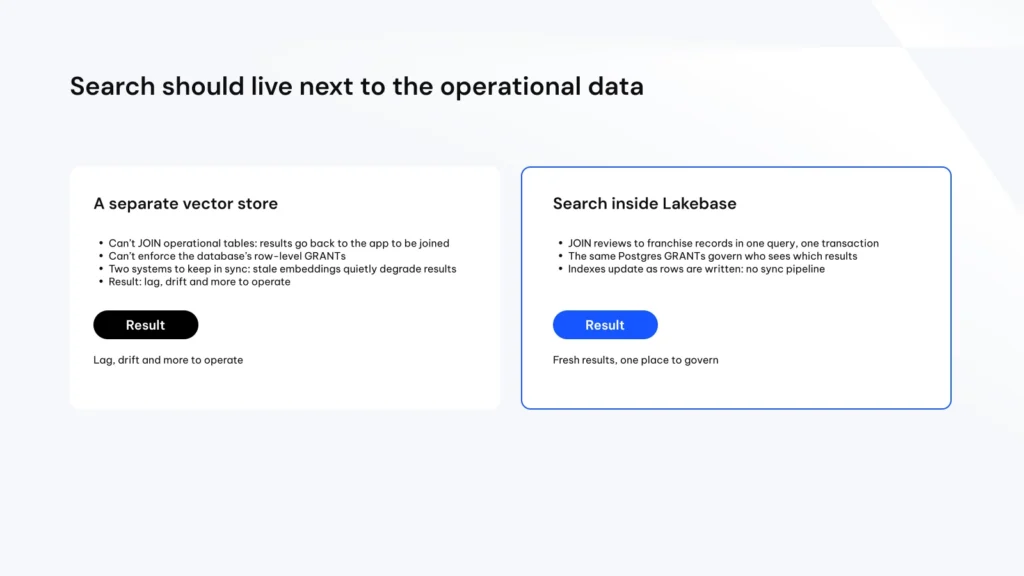
From our deck: why search should live next to the operational data.
Step 1: keyword vs. vector search
Postgres full-text search works like a badge check: the word matches or it doesn’t. Vector search compares meaning. Think of a map of cities where close meanings are close on the map; an index like HNSW hops from city to city instead of visiting all of them.
| Query | Keyword | Vector |
|---|---|---|
| citrus | Finds it | Drifts to reviews that just say “tasty” |
| smooth like ice cream | Finds nothing | Finds the creamy reviews by meaning |
Vector isn’t always better. Each one fails in a different place.
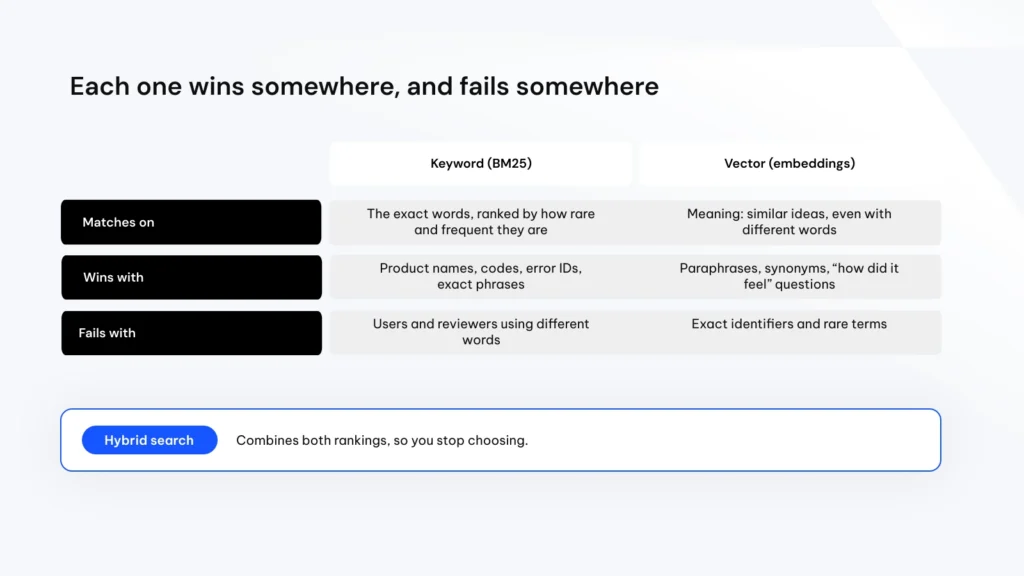
From our deck: each one wins somewhere, and fails somewhere.
Step 2: hybrid search with Lakebase Search
Lakebase Search adds two index types: BM25 to rank keywords by relevance, and an approximate nearest neighbor index for vectors. It’s generally available on AWS and Azure since September 2026. Enabling it on a table is a small migration:
CREATE EXTENSION IF NOT EXISTS lakebase_vector CASCADE;
CREATE EXTENSION IF NOT EXISTS lakebase_text;

ALTER TABLE reviews
  ADD COLUMN IF NOT EXISTS search_terms tsvector
  GENERATED ALWAYS AS
    (to_tsvector('english', review)) STORED;

CREATE INDEX IF NOT EXISTS idx_reviews_keyword
  ON reviews USING lakebase_bm25 (search_terms);

CREATE INDEX IF NOT EXISTS idx_reviews_vector
  ON reviews USING lakebase_ann
  (embedding vector_cosine_ops);
Then merge both rankings with Reciprocal Rank Fusion. One list has A to E, the other D to H; whatever appears in both moves up:
  COALESCE(1.0 / (60 + keyword_hits.position), 0)
+ COALESCE(1.0 / (60 + vector_hits.position), 0)
  AS score
"too sweet and sugary cookies"
| What came back | |
|---|---|
| Keyword | Two rows, both real complaints. Precise, but misses anyone who complained in other words |
| Vector | The idea of sweetness, but drifts to positive reviews like “A Sweet Escape”: same topic, opposite opinion |
| Hybrid | Complaints first, but a positive review still in third place |
At this size the Lakebase Search indexes aren’t faster than pgvector; the reason to use them is scale. Also note: enabling Lakebase Search is a one-time UI step, can’t be undone, and restarts the project.
Step 3: AI sentiment with ai_query
Search doesn’t know opinion, so we label each review once with a model and keep the label as a column. This runs in Spark SQL over a temp view of unlabeled rows; labels go back to Lakebase with an UPDATE by review_id:
SELECT
  review_id,
  ai_query(
    'databricks-gpt-5-nano',
    CONCAT(:prompt, review)
  ) AS sentiment
FROM unlabeled_reviews
In our test, with one user, 194 reviews took about 25 seconds: 115 positive, 78 negative, 1 neutral. With sentiment = 'negative', the top five hybrid results were all complaints. The model runs once and the answer becomes data; every search after that is plain SQL.
Step 4: ship it safely with branching
In a real project this is the table production reads, so you don’t run ALTER TABLE on it directly. A branch is a copy that copies nothing: like post-its on a 1,000-page book that say “read the original”, writing only what changes, so it appears in seconds.
-
- Break it on purpose.
TRUNCATEon a branch: production still had 194 rows, the branch had 0. - Same app, different data. The only difference between the prod and dev app is one line in
app.yml:LAKEBASE_BRANCH. - No merge. To promote, run the same SQL migration on production. You take the recipe, not the cake.
- Break it on purpose.
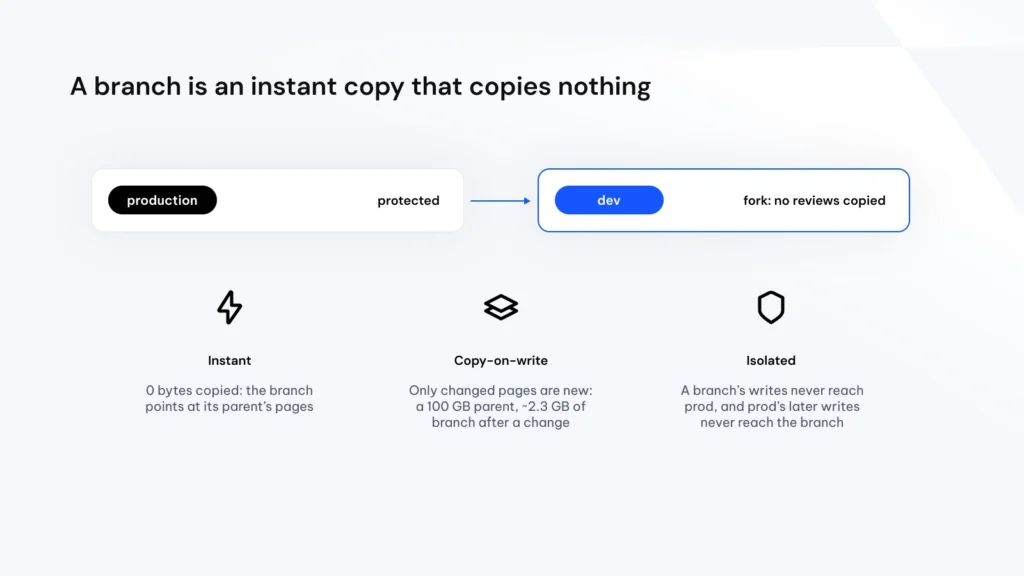
From our deck: a branch is an instant copy that copies nothing.
Run it yourself
A self-paced version (about an hour) with the slides: github.com/gllima/lakebase-search-branching-handson. You need a workspace with Lakebase and serverless notebooks, permission to create a Lakebase project, the samples catalog and the two model endpoints. The first section creates your project, loads and embeds the reviews and creates a dev branch in 2 to 3 minutes; the last cell deletes the project.
Tips if you run it for a team: test with a non-admin user, pin psycopg (3.2.10 worked for us on serverless), and create Postgres roles before the session, since creating a role restarts compute.
For branching in depth, see Lakebase Branching: Bringing Git-Style Workflows to Database Development.
-
What is Lakebase Search?
Lakebase Search adds full-text and vector search to Databricks Lakebase, the managed Postgres database of the Databricks Data + AI Platform. It provides a BM25 index for keyword relevance and an approximate nearest neighbor index for vectors, through the lakebase_text and lakebase_vector extensions. It is generally available on AWS and Azure since September 2026.
-
How does hybrid search work in Lakebase?
Hybrid search runs a keyword query and a vector query on the same table and merges both rankings with Reciprocal Rank Fusion, so results that appear in both lists move up. It all runs as one SQL query in Postgres, with no separate search system.
-
Can you enable and disable Lakebase Search?
Enabling Lakebase Search is a one-time step that cannot be undone, and it restarts the project’s compute. Plan it as a maintenance change.
-
How do you test schema changes safely in Lakebase?
Create a Lakebase branch, an instant copy that only stores what changes, and run the migration there first. Once it works, run the same SQL migration on production. Branches are not merged back.
Databricks Lakebase series
- Part 1: Databricks Lakebase and Spark Real-Time Mode for Aggregations
- Part 2: Databricks Lakebase Search and Branching: a Hands-On Guide (you are here)
- Part 3: Lakebase series. Serving Fraud Features from Databricks Lakebase
- Part 4: coming soon
Build on Databricks Lakebase with Qubika.
Qubika's Data Studio helps teams put Lakebase to work, from search and AI inside Postgres to safe, branch-based releases on Databricks.